Guide to Merge File Storage integrations
Last updated: May 7, 2026
Overview
Merge allows you to connect to any supported file storage system through a single, unified API. This guide provides a high-level overview of our general approach.
When you're ready, you can explore our more detailed integration-specific guides, linked at the bottom of this article, which outline behaviors that may vary across platforms.
Authentication
Merge offers three categories of authentication, support varies based on integration:
Super admin
Admin
Individual
With admin authentication, Merge pulls metadata for all files that the admin has access to. For select integrations, Merge also supports super admin access, which includes access to private files created by other users.
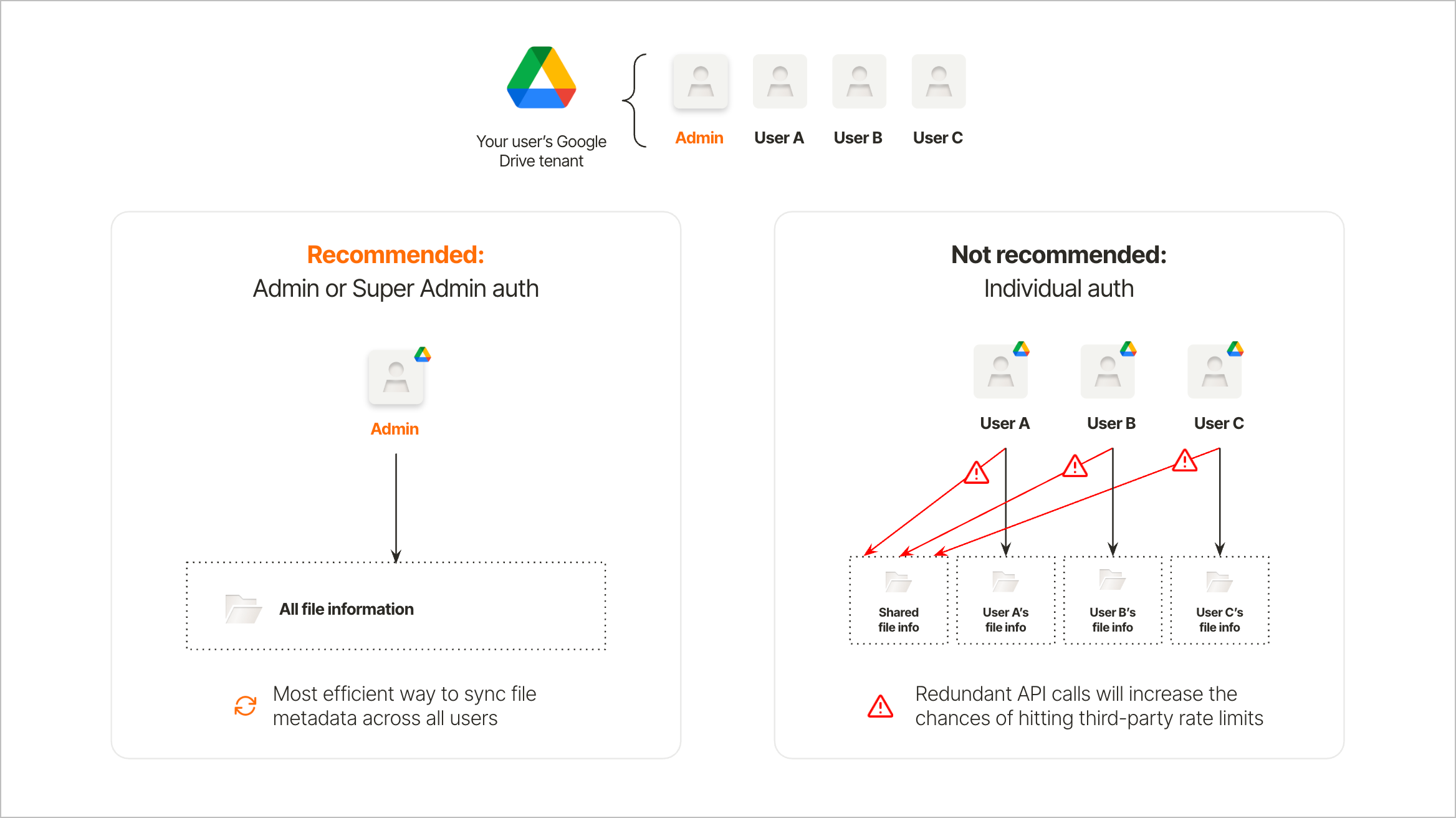
Merge recommends admin or super admin authentication for File Storage integrations for the following reasons:
Using up less third-party rate limits: Merge automatically handles third-party rate limits and backs off when a Linked Account is nearing these rate limits. Connecting one admin-level Linked Account is a more efficient use of these rate limits
Faster syncs: Backing off when nearing third-party rate limits slows down syncs. Multiple individual-user Linked Accounts will unnecessarily slow down how quickly you can sync all the data you need from a particular end-user organization
Access Control Lists (ACLs): Merge’s permissions models allow you to track who should have access to each file and build accurate ACLs. These are especially valuable when admin authentication is used as they provide precise data on permissions across the end user’s organization. Permissions models will still be mapped for Linked Accounts using individual authentication. However, they will not include permissions data for files that individual does not have access to.
While Merge supports on-demand downloads, third-party APIs need to be polled to pull the metadata that will support ACLs and file downloads. In a scenario where your end user opts to do individual instead of admin authentication, they run the risk of delayed syncs. In that scenario, some drives, files, and folders will be retrieved from third-party APIs across multiple linked accounts. The repeated API calls for the same files will use up that third-party instances rate limits at a higher rate.
See our guide to understand why specific scopes are needed:
📄 Why are specific scopes needed for File Storage integrations?
Access control lists
An Access Control List is a security feature used in systems (e.g., networking, file systems, databases) to define rules for what users or systems can access specific resources and what actions they can perform on them.
Learn more about File Storage ACLs:
Downloading files
Merge intentionally do not store file contents but only store the file's metadata and permissions, while the content is fetched on demand. Our customers can build their own ingestion and indexing pipeline (best practice guide) using the download endpoint.
To learn how to download files, see:
Merge includes a checksum with each file object to help verify file integrity and authenticity. This is provided as a string that includes the hash type (as supported by the third-party API) and the content_hash. In some cases—such as when a file is moved from a personal to a business account—the hash type may change. When this happens, Merge automatically updates the check_sum to reflect the new hash type and value.
# indicates that the file has a sha256 type hash and content_hash value

check_sum: {
   "type": "sha256"
   "content_hash": "149afbf4c8996fb92427ae41e4649b934852b855"
}

# indicates that the API didn't return a checksum value

"checksum": {
    "type": "sha256",
    "content_hash": null
}

# indicates that the file hasn't been synced yet

"checksum": {
    "type": null,
    "content_hash": null
}
Optimized data transfer
Selective Sync
Selective Sync lets your users select which folders and drives to grant access to. It also speeds up initial syncs by ensuring only relevant data is synced. This can be surfaced to your users as part of the Merge linking flow and be edited at any point.
See our guide to learn more about File Picker Selective Sync.
Syncing data
Merge uses two mechanisms to efficiently sync data from third-party APIs:
Polling third-party APIs on a cadence to capture recurring updates
Receiving near real-time updates via third-party webhooks
These are optimized to sync data as efficiently as possible within the constraints of the third-party system involved. The highest sync frequencies provided by Merge are optimized based on third-party rate limits and performance at scale.
File storage systems are highly dynamic, with constant changes to both content and permissions. Users frequently add, move, edit and delete files, while permissions evolve as employees join organizations and content gets reorganized across folders and drives.
For applications that require near-real time delivery of accurate information, having access to the latest data is critical. This means keeping up with newly created files, excluding recently deleted files, or updating who should no longer have access to a file.
For AI and other near real-time use cases, Merge recommends using the highest sync frequency. For some models and integrations, recurring syncs run every few minutes to poll the latest data, ensuring that your system keeps up with the frequency of updates made by your end users. Consistently polling the third-party API provides the most comprehensive way of capturing all relevant changes. Third-party webhooks, while complementary, may have coverage gaps or be affected by third-party system outages, leading to missed updates.
Rate limits
Merge accounts for third-party rate limits when syncing data. These are different from the standardized Merge rate limits (number of API calls per minute that you can request to Merge's API).
Integration-specific guides
We highly recommend reading these guides before implementing Merge File Storage. They contain critical information essential for your implementation.