Greenhouse - How do I set up my partner credentials?
Last updated: June 17, 2026
Overview
To allow your customers to link Greenhouse with Merge, you will need to set up a Greenhouse OAuth App and enter your application's credentials within Merge.
Instructions
Step 1: Submit a Greenhouse integration request form
If you are already an official Greenhouse partner with a signed agreement, proceed directly to Step 2.
If you haven't already done so, you'll need to sign an agreement with Greenhouse. Start the process by submitting the integration request form below.
Applications are reviewed by Greenhouse on the first Monday of every month. After completing their review, Greenhouse will share an API agreement with you.
Step 2: Email Greenhouse to retrieve your partner credentials
After receiving an API agreement from Greenhouse, you'll be able to retrieve your Client ID and Client Secret by emailing [email protected]. The email should contain the following:
The name of your integration
Environment (unless just using for testing, choose Production)
Redirect URI:
https://app.merge.dev/oauth/callbackA 128x128 logo
A sample email body is below.
Hello Greenhouse team,

We're working with Merge to build an integration with Greenhouse. We have completed the partnership agreement process and would like to request our Client ID and Client Secret to proceed.

Please find our integration details below:

Integration Name: [Your Product / Integration Name]
Environment: [Sandbox / Production]
Required Scopes: [List of required scopes, e.g., harvest:job_posts, harvest:candidates, see usage below]
Redirect URI: https://app.merge.dev/oauth/callback
Logo: attached [Attach a 128x128 logo file to this email]

Please let me know if you need any additional information from our side. We appreciate your support and look forward to moving ahead with the integration.
Scopes
Set the following scopes to enable access for all Merge Common Models. You may choose to remove scopes if not needed for your use case.
Scope | Scope description | Used for |
| Allows moving applications to a new job stage in Greenhouse. | Application (Edit/Write) |
| Allows creating departments in Greenhouse. | Department (Write) |
| Allows creating offices in Greenhouse. | Office (Write) |
| Allows creating candidate tags in Greenhouse. | Tag (Write) |
| Allows creating attachments in Greenhouse. | Attachment (Write), Candidate (Write) |
| Allows creating users in Greenhouse. | RemoteUser (Write) |
| Allows creating candidates in Greenhouse. | Candidate (Write) |
| Allows updating existing candidates in Greenhouse. | Candidate (Write/Edit) |
| Allows creating interviews in Greenhouse. | Scheduled Interview (Write) |
| Allows creating applications in Greenhouse. | Application (Write) |
| Allows creating notes in Greenhouse, such as emails or notes. | Activity (Write) |
| Allows listing applications from Greenhouse. | Application (Read/Write), Candidate (Read), RemoteUser (Read), RejectReason (Read), Job (Read), JobInterviewStage (Read) |
| Allows listing candidate tags from Greenhouse. | Tag (Read) |
| Allows listing candidates from Greenhouse. | Candidate (Read), EmailAddress (Read), PhoneNumber (Read), Tag (Read), Url (Read) |
| Allows listing departments from Greenhouse. | Department (Read) |
| Allows listing EEOC data from Greenhouse. | EEOC (Read), Candidate (Read) |
| Allows listing interviewers from Greenhouse. | Application (Read), JobInterviewStage (Read), RemoteUser (Read), ScheduledInterview (Read), Scorecard (Read) |
| Allows listing interviews from Greenhouse. | Application (Read), JobInterviewStage (Read), RemoteUser (Read), ScheduledInterview (Read), Scorecard (Read) |
| Allows listing job interview stages from Greenhouse. | Job (Read), JobInterviewStage (Read) |
| Allows listing job interviews from Greenhouse. | Application (Read), JobInterviewStage (Read), RemoteUser (Read), ScheduledInterview (Read), Scorecard (Read) |
| Allows listing job posts from Greenhouse. | Job (Read), Job Posting (Read), ScreeningQuestion (Read), ScreeningQuestion Option (Read) |
| Allows listing jobs from Greenhouse. | Department (Read), Job (Read), Office (Read), RemoteUser (Read) |
| Allows listing notes from Greenhouse. | Activity (Read), Candidate (Read), RemoteUser (Read) |
| Allows listing offers from Greenhouse. | Application (Read), Offer (Read) |
| Allows listing offices from Greenhouse. | Job (Read), Office (Read) |
| Allows listing rejection reasons from Greenhouse. | RejectReason (Read) |
| Allows listing scorecards from Greenhouse. | Scorecard (Read), Application (Read), RemoteUser (Read) |
| Allows listing sources from Greenhouse. | Application (Read/Write), Candidate (Read/Write), Job (Read), JobInterviewStage (Read), RejectReason (Read), RemoteUser (Read) |
| Allows listing users from Greenhouse. | RemoteUser (Read), Validate during linking |
| Allows listing job hiring managers from Greenhouse. | RemoteUser (Read) |
| Allows listing openings from Greenhouse. | Application (Read), Offer (Read), Department (Read), Job (Read), Office (Read), RemoteUser (Read) |
| Allows listing attachments from Greenhouse. | Attachment (Read), Candidate (Read) |
| Allows listing rejection details from Greenhouse. | RejectReason (Read), Application (Read), JobInterviewStage (Read) |
| Allows listing application stages from Greenhouse. | Application (Read/Write/Edit), Candidate (Write), JobInterviewStage (Read), RemoteUser (Read), Job (Read) |
Step 3: Input your Client ID and Client Secret within Merge
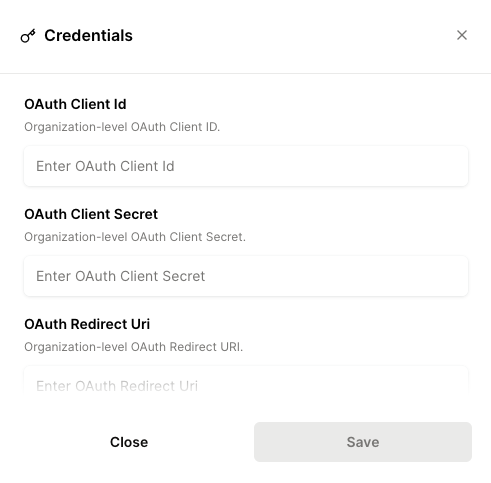
After receiving your Client ID and Client Secret from Greenhouse, navigate to the Integrations page in the Merge dashboard.
Expand the Greenhouse integration and select Edit.
For each parameter, click Edit and enter the corresponding values below:
OAuth Client Id: Client ID value provided by Greenhouse
OAuth Client Secret: Client Secret value provided by Greenhouse
OAuth Redirect URI:
https://app.merge.dev/oauth/callbackScope: OAuth scopes, provisioned by Greenhouse (space-separated list)