Managing webhooks across environments
Last updated: July 18, 2025
Overview
If your production and test (staging) linked accounts are under the same Merge organization, you may encounter webhook issues. Test activity can trigger webhooks meant for production systems, leading to noise, failures, and confusion.
To improve webhook reliability and maintain clear separation between environments, we strongly recommend using separate Merge organizations for production and testing.
Problems with shared environments
Using a single Merge organization for both production and test accounts can cause:
Webhooks firing on test activity that affect production endpoints
Increased noise, making it harder to distinguish real versus test data
Risk of accidental production disruptions during staging experiments
Recommended setup
To avoid these problems, the best practice is to:
Create a dedicated Merge organization for test and staging accounts
Reserve your primary Merge organization for production use only
Route webhooks separately for each environment
This approach is widely used and ensures a cleaner, more reliable integration lifecycle.
Using one Merge organization for webhook events
If your system can reliably identify and handle test activity such as by filtering staging events inside your production webhook handler, you may be able to use a single organization. However, this requires extra logic and increases risk.
For most customers, separate organizations are the simpler and safer approach.
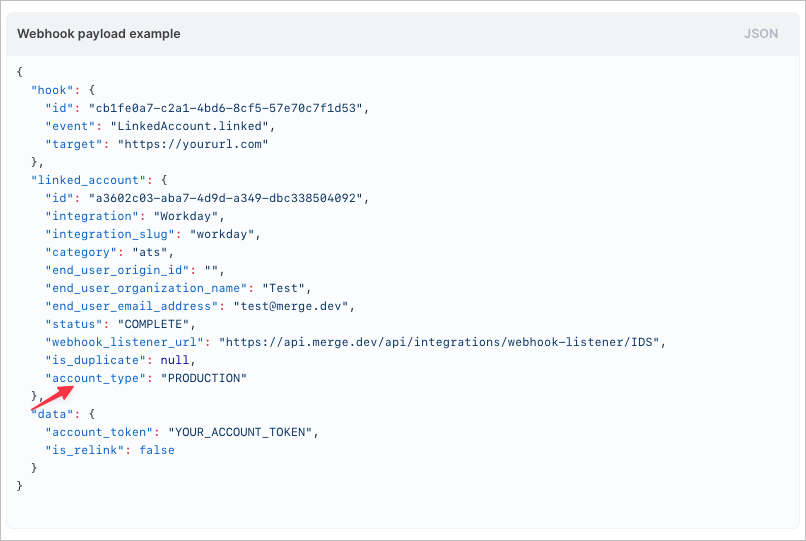
You can determine whether a webhook belongs to a production or test linked account by examining the account_type property in the linked_account object within the webhook payload.
Summary
Using separate Merge organizations for staging and production is not just a workaround. It is a proven best practice. It simplifies debugging, reduces webhook noise, and aligns with how leading teams manage live webhook environments.
If you are unsure how to set this up, reach out to our team at [email protected] for help getting started.