SAP SuccessFactors - Debugging missing permissions for invalid property names on /EmpJob
Last updated: January 12, 2026
Overview
This article helps you resolve Missing Permissions issues in Merge when SAP SuccessFactors returns “Invalid property names” errors on EmpJob, using employeeTypeNav as the example.
What you’ll see
A Merge Issue showing a permissions error tied to a failed log that uses an
$expandon EmpJobSAP's response returns 400 with messages like:
[COE0021] Invalid property names: EmpJob/employeeTypeNavFor other fields, you'll see variants like
EmpJob/employmentTypeNav,EmpJob/positionNav, and more.
Example response surfaced in logs:
{
  "error": {
    "code": "COE_PROPERTY_NOT_FOUND",
    "message": {
      "lang": "en-US",
      "value": "[COE0021]Invalid property names: EmpJob/employeeTypeNav. Please check the property name in Admin Center > OData API Data Dictionary or entity metadata. Ensure there were no data model changes that removed this field, and please execute a refresh metadata to ensure the cache is not corrupted."
    }
  }
}
Why this happens
If the corresponding field for employeeTypeNav is disabled or not configured, the navigation property will not appear in the OData API Data Dictionary and will not be accessible via API. Even after fixing the configuration, SAP’s metadata cache may need a refresh to take effect.
Impact
When Merge encounters a 400 “Invalid property names” from /EmpJob, we
Remove the exact expand that caused the failure
Surface a Missing Permissions issue in your dashboard
Continue the rest of the sync so other data still flows
Syncs will still continue as normal. Depending on the specific property name that is invalid, there may be data that Merge is not able to sync.
If you see a Missing Permissions Issue for an SAP Linked Account, we recommend checking the synced data to verify if any of your required fields are missing.
If there is nothing missing, you can safely ignore the Issue.
Resolution steps
Step 1: Confirm whether the property exists in SAP
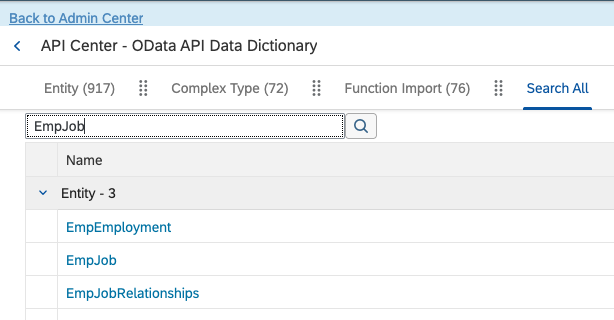
In SAP Admin Center, search for and enter OData API Data Dictionary

Search for EmpJob
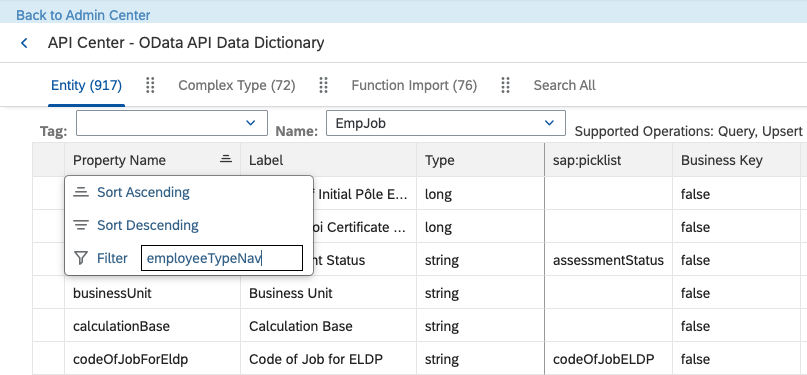
Filter the Property Name column to employeeTypeNav
If present, proceed to Step 3
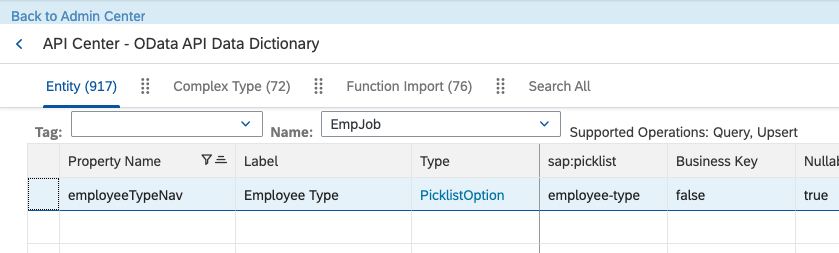
If missing, go to Step 2
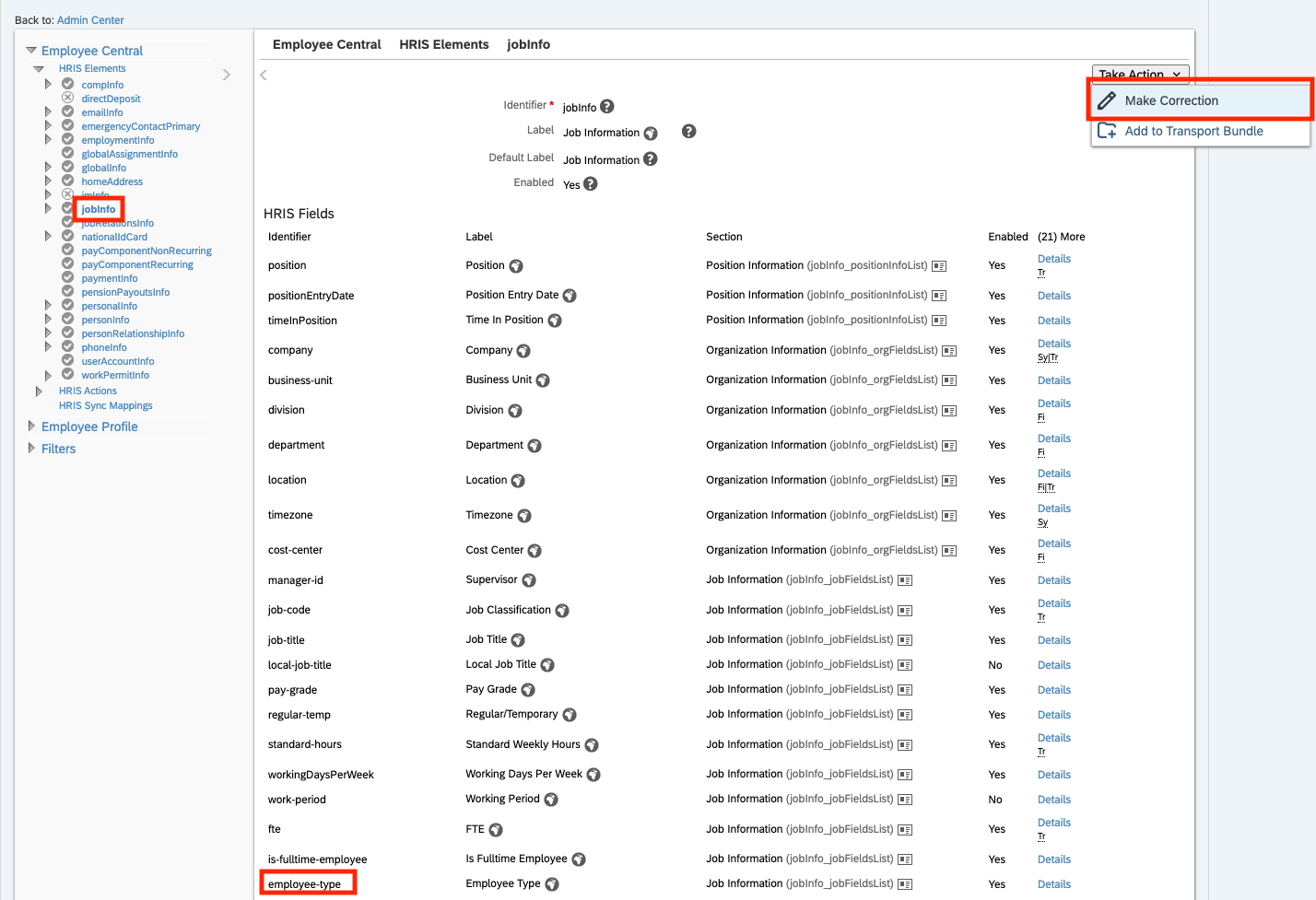
Step 2: Enable and correctly configure "employee-type" in Business Configuration
If this is disabled, Step 2 will be dependent on whether your customer is comfortable changing their Business Configuration to enable this field.
If your customer does not want to change their configuration to enable this field, please reach out to your Customer Success Manager and Solutions Architect to discuss further options.
In Admin Center, search for Manage Business Configuration

Enter jobInfo
In the row for employee-type, check the Enabled column
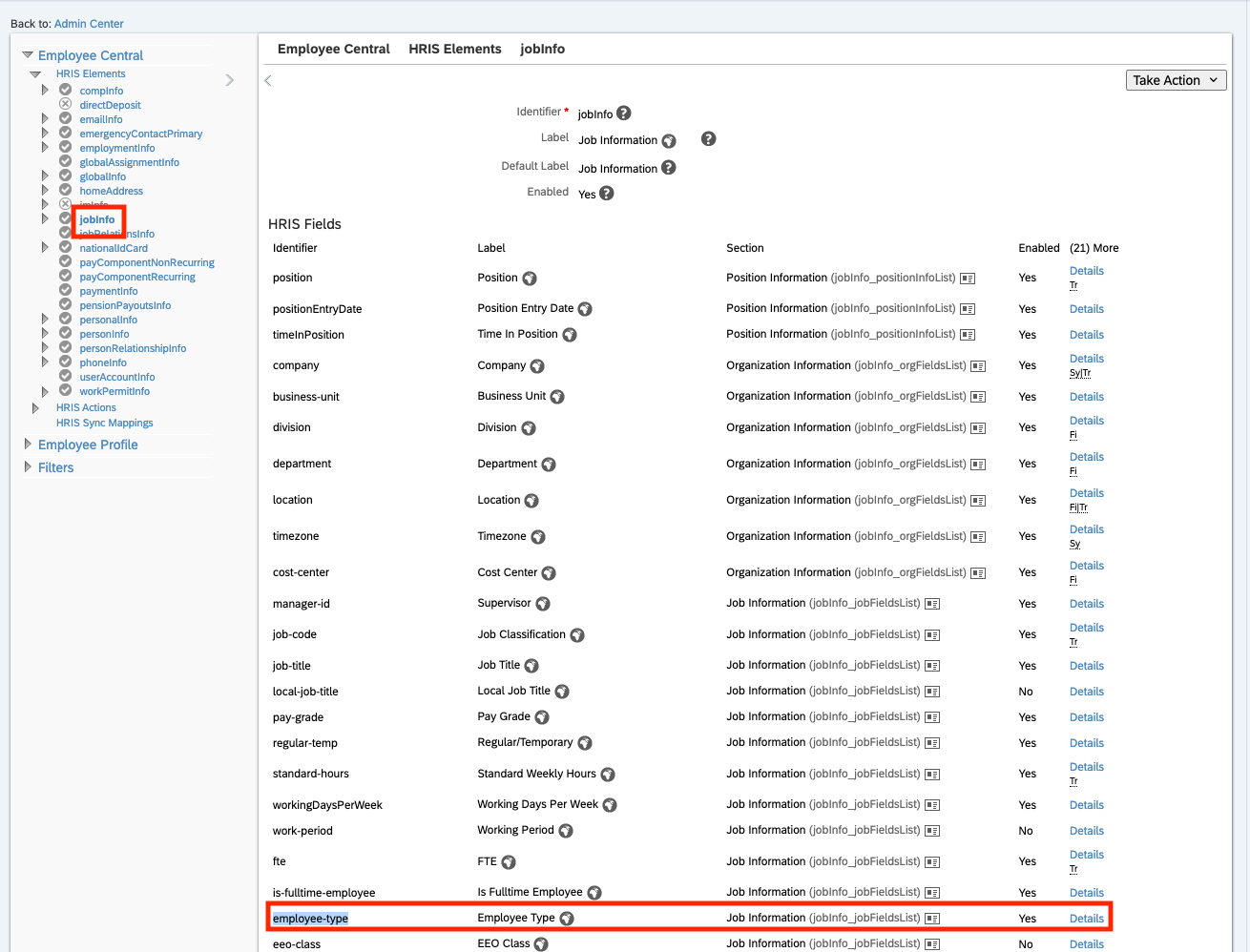
Open Take Action in the upper right, click Make Correction
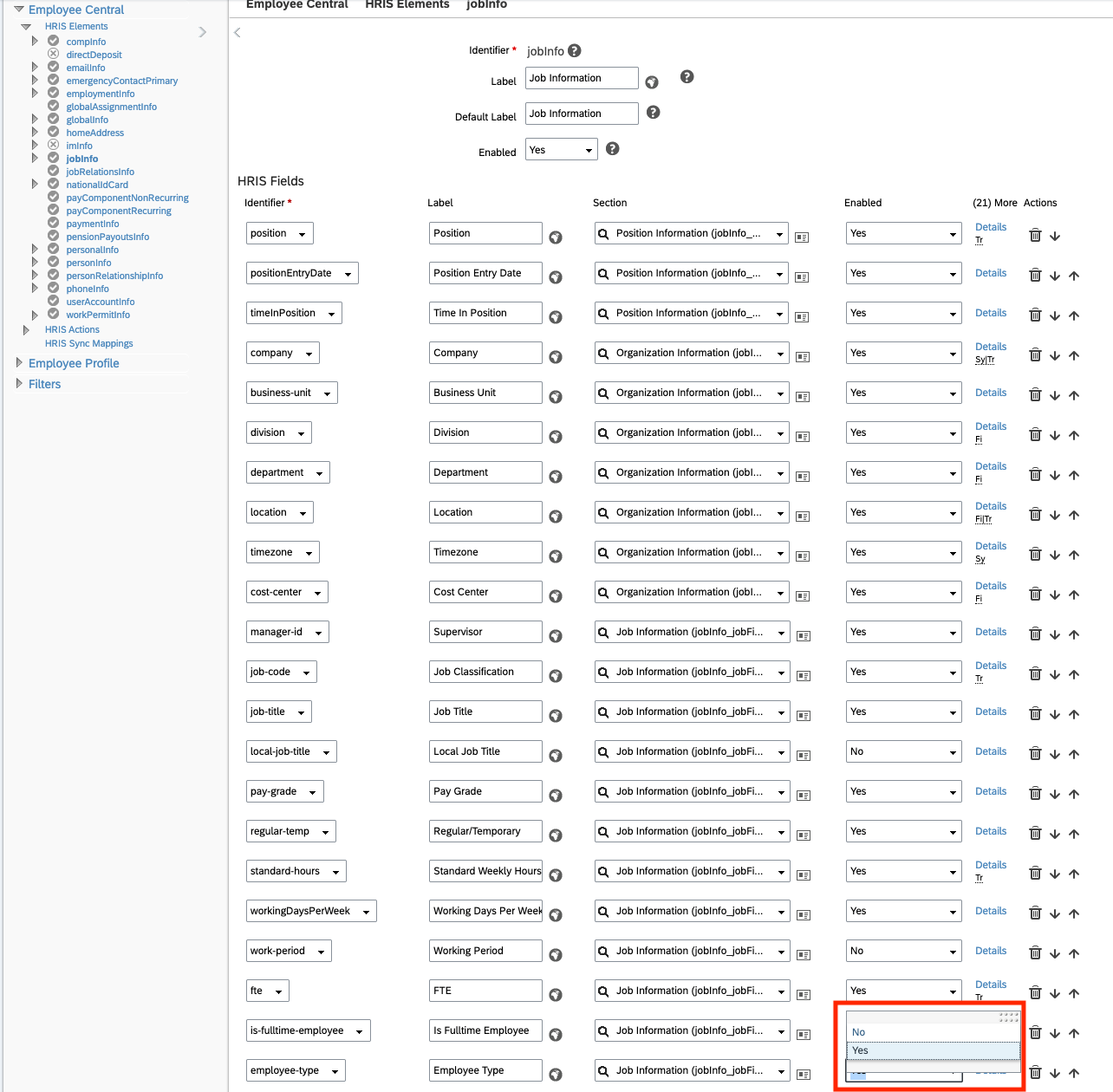
Set Enabled to Yes
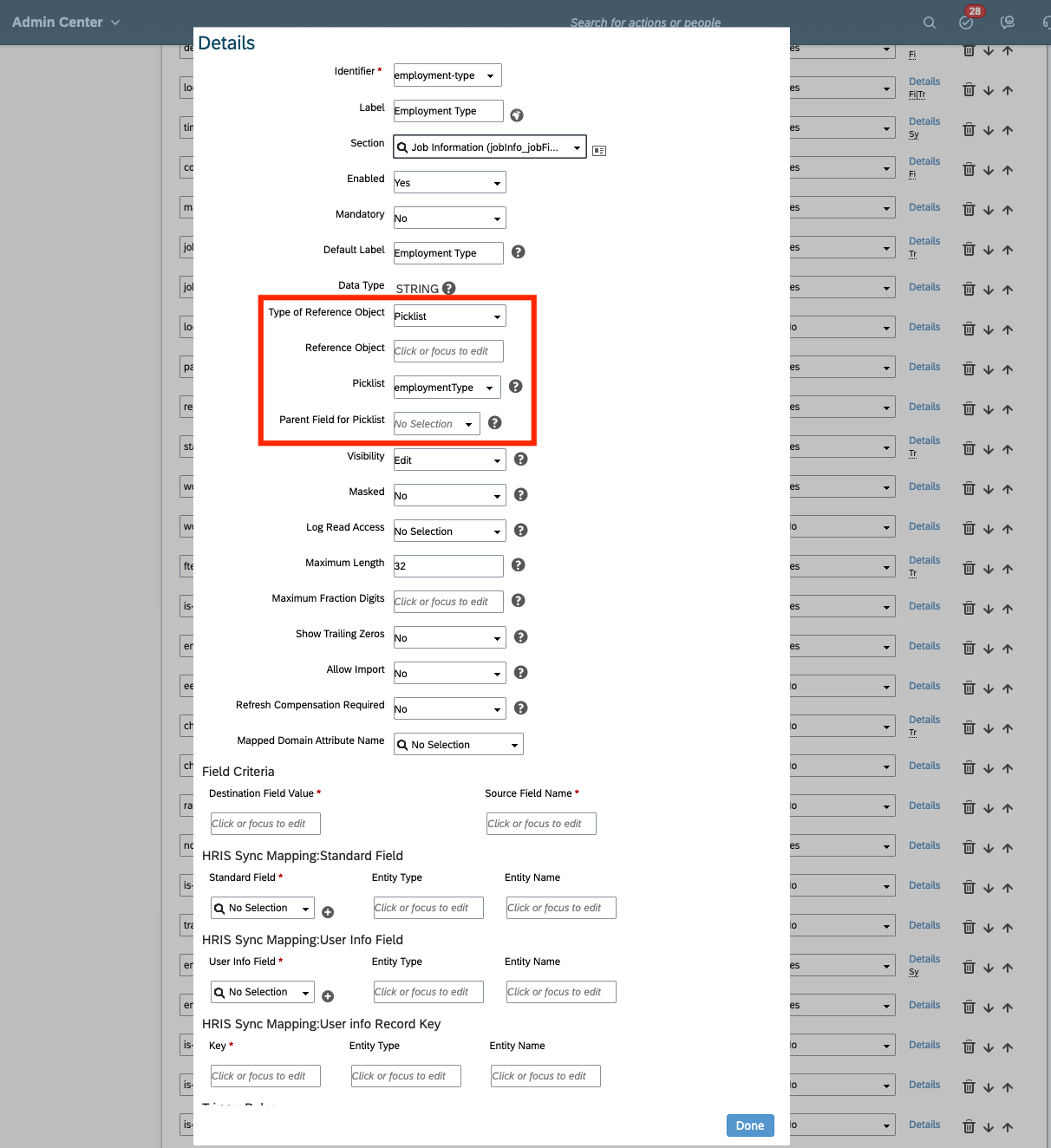
Click Details for employee-type and ensure it’s configured as a Picklist
Step 3: Refresh SAP OData metadata cache
In Admin Center, search for OData API Metadata Refresh and Export

Click Refresh next to Cache
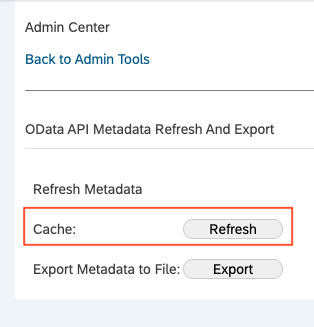
When clicking on Refresh, the message Refresh Successful! will be displayed after metadata gets refreshed.
If the error persists, try refreshing again after a few minutes. In rare cases, cache desynchronization may require multiple refreshes or SAP Support assistance.
Step 4: Verify
After updating configuration and refreshing metadata:
Using API Tester, send an small API call from Merge -> Third party that expands the previously failing property. Here's a URL example:
/odata/v2/EmpJob?$top=1&$select=userId&$expand=employeeTypeNav
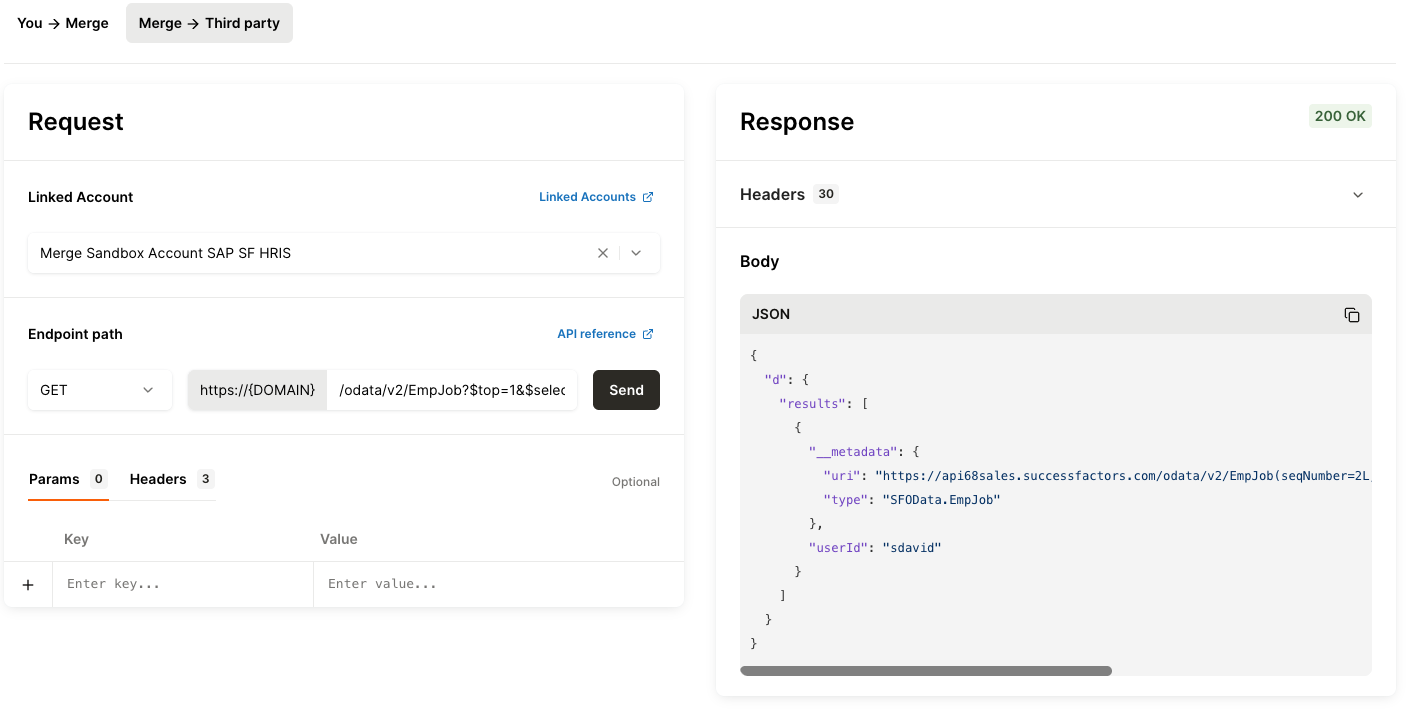
If the request succeeds, Merge can now access
employeeTypeNavin subsequent syncs!
Why this works
These steps resolve most Missing Permissions issues of this type because:
The OData entity may be missing the navigation property entirely.
The underlying field (
employee-type) may be disabled in Business Configuration.The SAP instance’s API metadata may be outdated and still returning old schema information
FAQs
I don’t have an
EmpJob/employeeTypeNaverror. I seeEmpJob/employmentTypeNavor anotherEmpJob/<field>. Do the same steps apply?Yes! Follow the same steps but search for the corresponding property in OData API Data Dictionary and the matching field under jobInfo in Manage Business Configuration.
We refreshed metadata but the error still shows occasionally. Why?
SAP notes that cache can become outdated or corrupted due to data center conditions. If a refresh doesn’t take effect immediately, try again after a short interval. If the problem persists despite correct configuration, contact Merge Support for additional guidance. Your customer may need to open an SAP ticket for cache issues.
What if we doesn’t use
employee-typeor the expanded field at all?If your use case does not depend on data from
employeeTypeNav(or the specific expanded field), Merge will continue syncing other data. You can safely ignore the warning.
Additional SAP resources
These SAP Knowledge Base articles provide additional details and cover related edge cases:
SAP KBA 3291073: Error:
EmpJob/employmentTypeNavmissing
SAP KBA 3146917: Troubleshooting Invalid Property Name Issues
Includes additional causes and troubleshooting steps
If the issue persists
If the employeeTypeNav property is enabled and metadata refreshed but the error continues:
Re-review the steps above and SAP knowledge base articles above for additional root causes.
Confirm the user has access permissions for the
EmpJobentity and related picklists.Reach out to Merge Support for further analysis, there may be additional entity-level or instance-specific configuration differences.