Implementing Merge with an AI coding agent - Sync triggers
Last updated: January 5, 2026
Overview
This article is part of a series to help developers accelerate a Merge implementation by leveraging coding agents (e.g., Claude Code, Copilot, or similar). These prompts aren’t intended to replace engineering work, but to streamline implementation and reduce repetitive coding overhead.
The goal of this article is to implement reliable sync triggers that orchestrate data retrieval from Merge. On the frontend, there should be an element in your UI that sets expectations with users about initial sync times. By the end of this article, you’ll have working backend triggers that automatically fetch data when initial syncs complete and maintain freshness through incremental updates
Please read before beginning
There are a few pre-requisites and things to keep in mind before continuing through this article:
Agents aren't perfect. Always review the code changes that it suggests.
You should already have a valid Merge API key stored securely.
You should have a linked accounts table with columns like
id,end_user_origin_id,category,linked_account_id,account_token, andstatus. We'll be adding additional columns to track syncing timestamps.You should store your webhook security signature found in the Merge Dashboard (
https://app.merge.dev/configuration/webhooks) in your.envfile asMERGE_WEBHOOK_SECRET.
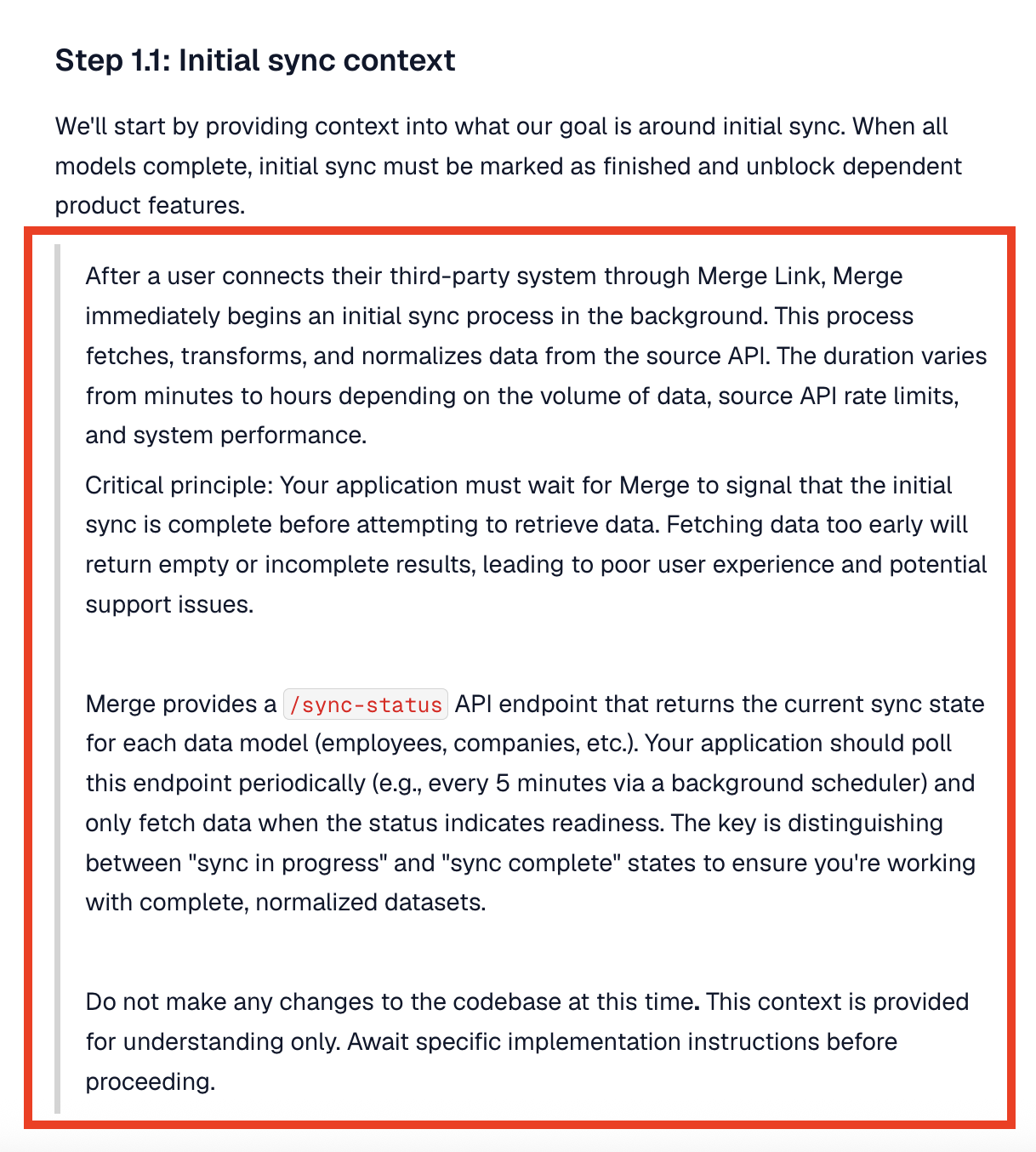
Prompts you should provide to the agent are quoted. For example, in the image below, the prompt should be all of the content in the red box.
At this point, we highly recommend that you have mapped out answers to the following questions:
Which Merge common models will you use? (eg.
Employees,Employments,Groups, etc.)Where do they land? Make sure to map out the destination tables/entities in your system per model.
Field mappings & transforms. For every destination field, specify the Merge field(s) used and any transforms (normalization, defaults, lookups to local enums, etc).
Unique identifiers. Confirm you'll key rows by
linked_account_id+ identifier (remote_idandid), not by human-readable names.Delete semantics. Define how you'll represent deletes/archival from the source (soft delete flag vs. tombstone row).
You should also have small, purpose-built tables per model you consume. Keep consistent cross-cutting columns for observability and reconciliation.
Step 1: Context setting
These markdown files should be added to your codebase to provide your coding agent additional context. Before getting started, ask the agent to read through them, so it understands the Merge implementation workflow
We need to start by providing the coding agent context into how Merge works and what changes it may need to make to your code. The markdown files and the prompt below will provide it the necessary context to assist you in building into Merge.
Parse through this link (https://r.jina.ai/https://docs.merge.dev/basics/syncing-data/) to understand Merge's recommendations around syncing data. We've already configured the linking flow so now we need to use the
account_tokenfor each linked account to begin making calls to Merge to sync the normalized data.Do not make changes.
Step 1.1: Initial sync context
We'll start by providing context into what our goal is around initial sync. When all models complete, initial sync must be marked as finished and unblock dependent product features.
After a user connects their third-party system through Merge Link, Merge immediately begins an initial sync process in the background. This process fetches, transforms, and normalizes data from the source API. The duration varies from minutes to hours depending on the volume of data, source API rate limits, and system performance.
Critical principle: Your application must wait for Merge to signal that the initial sync is complete before attempting to retrieve data. Fetching data too early will return empty or incomplete results, leading to poor user experience and potential support issues.
Merge provides a
/sync-statusAPI endpoint that returns the current sync state for each data model (employees, companies, etc.). Your application should poll this endpoint periodically (e.g., every 5 minutes via a background scheduler) and only fetch data when the status indicates readiness. The key is distinguishing between "sync in progress" and "sync complete" states to ensure you're working with complete, normalized datasets.
Do not make any changes to the codebase at this time. This context is provided for understanding only. Await specific implementation instructions before proceeding.
Step 1.2: Subsequent sync logic context
After the initial sync is complete, we'll need to switch to incremental fetches using the modified_after query parameter. For each linked account, we'll have to save and store a last synced timestamp and call the list endpoint with modified_after = <last synced timestamp>. The last synced timestamp should be the start time of a sync between your backend and Merge.
Sync frequencies based on billing plan? Considerations for daily vs highest sync?
Parse through this link (https://r.jina.ai/https://help.merge.dev/articles/6188145-the-modified-after-timestamp) to get an understanding of the
modified_aftertimestamp. After the initial sync completes, Merge continues to periodically sync data from the connected third-party system in the background. However, Merge does not automatically push updates to your application - you must actively retrieve them using incremental fetches.Critical principle: Use the
modified_afterquery parameter with each API request to fetch only records that changed since your last sync. This requires tracking a "last synced timestamp" for each linked account and data model. The timestamp should represent the start time of your sync operation (not the end time) to avoid missing records that changed during the sync window.
Two complementary strategies exist for staying current:
1. Event-driven (webhooks): Merge notifies your application when new data is available, enabling near real-time updates
2. Time-based (polling): Your application periodically checks for updates at regular intervals (e.g., every 5 minutes, hourly, daily)
Best practice: Implement both strategies together. Webhooks provide speed and efficiency for routine updates, while polling acts as a safety net to catch any webhook delivery failures or missed events. The optimal sync frequency depends on your specific requirements: real-time needs, API rate limits, database capacity, and user expectations for data freshness.
Do not make any changes to the codebase at this time. This context is provided for understanding only. Await specific implementation instructions before proceeding.
Step 2: Implementing initial sync triggers
The initial sync loads a complete baseline of all required data models for a linked account, and you'll need to detect when this process completes. Merge offers two detection methods: webhooks and polling. Webhooks provide real-time notifications when sync operations finish - you can subscribe to LinkedAccount.sync_completed to trigger your import once all models are ready, or use granular {CommonModel}.synced events (like Employee.synced or Employment.synced) to process models progressively as they become available. However, webhooks should never be your sole data retrieval mechanism. Even though Merge attempts redelivery using exponential backoff, webhook receivers can miss notifications due to downtime or network issues.
We strongly recommend implementing periodic polling (at least every 24 hours) as a safety net. When processing webhooks, always verify the signature for security (detailed in Merge's Webhooks guide), and respond within 30 seconds to avoid automatic retries.
Polling offers a simpler alternative if webhooks are difficult to implement - repeatedly call the /sync-status endpoint (typically every 5 minutes) until either status equals "DONE" or is_initial_sync equals false, indicating the initial sync has completed. The best approach combines both methods: use webhooks for responsive, real-time updates while maintaining a polling fallback to ensure no data is ever missed.
The following prompts outline sync triggers for a use case involving Merge's highest sync frequency. Your polling cadence and syncing frequency will vary depending on use case, integration (specifics for each integration can be found here), and Merge billing plan.
Step 2.1 Choose your detection method
We recommend implementing polling for initial sync detection, as it's straightforward and reliable. While Merge recommends webhooks for production environments, polling at a set cadence provides adequate data freshness for most use cases and is significantly simpler to implement and maintain. For production systems requiring real-time updates, consider implementing Merge webhooks as documented in the webhook guide. This requires additional infrastructure including webhook signature verification, async job processing, and a publicly accessible endpoint.
Step 2.2: Implementing polling (simplest - start here)
The goal of this section is to create the backend triggers needed to determine when initial has completed by polling Merge's sync-status endpoint.
Step 2.2.1: Implementation
Implement Initial Sync Polling Detection
Context: read the following markdown files to understand Merge integration fundamentals:
1. merge_platform_overview.md - Focus on "Initial Sync Lifecycle" and "Detecting Data Readiness" sections
2. merge_backend_implementation.md - API patterns and authentication details
Task: implement a polling mechanism that detects when Merge's initial sync completes after a user connects their integration via Merge Link. This polling job will continue running to handle subsequent syncs after initial sync completes.
Requirements
1. Scheduled Polling Job: ceate a background job that periodically checks sync status for all active integrations.
Polling Pattern:
- Run every 5-15 minutes (recommended: 10 minutes for initial sync detection) - Query all active linked accounts from your database
- For each integration, call GET /api/{category}/v1/sync-status with the integration's account_token
- Continue polling indefinitely - this same job handles both initial and subsequent sync detection
2. Initial Sync Detection Logic: for each model in the sync status response, check if initial sync is complete:
for each model in sync_status.results: # Skip disabled models if model.status == "DISABLED": continue
Check if initial sync is complete
initial_sync_complete = (
model.status == "DONE"
OR
model.is_initial_sync == false
)
if initial_sync_complete:
# Model data is ready
mark_model_as_ready(model.model_id)
Critical Logic:
- `status == "DONE"`: Catches sync completion in real-time
- `is_initial_sync == false`: Catches completion if you poll after sync already finished
- Use **OR** logic to handle both timing scenarios
3. Mark Integration as Ready
Once ALL enabled models (non-DISABLED) show initial sync complete for the first time:
- Update integration record: set `initial_sync_complete = true`
- Trigger any post-sync actions (data fetching, user notification, etc.)
- Polling continues - the job now monitors for subsequent syncs
4. Error Handling
- Log errors but continue polling other integrations if one fails
- Implement exponential backoff for repeated failures on specific integrations
- Don't stop the entire polling job due to one integration's errors
Expected Flow
Initial Sync Phase:
1. User completes Merge Link → Integration created in database
2. Polling job runs → Checks sync status for this new integration
3. Initial check: All models show `is_initial_sync: true`, `status: "SYNCING"` → Wait
4. Subsequent check: Models show `status: "DONE"` or `is_initial_sync: false` → Mark ready
5. All models ready → Set `initial_sync_complete = true`
Ongoing Phase:
6. Polling continues for this integration
7. Job now uses subsequent sync logic (handled in future implementation)
8. Same job, but the schedule may change depending on sync frequency. Additionally there will be different detection logic based on `initial_sync_complete` flag
Database Tracking (Minimal for Initial Sync):
Track whether initial sync has been confirmed complete:
Required field:
- `initial_sync_complete` (boolean) - Default: `false`
- Set to `true` when all enabled models show initial sync complete
- Used to determine which detection logic to apply (initial vs subsequent)
Implementation Notes:
- Single polling job handles entire lifecycle (initial + subsequent syncs)
- Focus this implementation on initial sync detection logic only
- Subsequent sync logic will be added later to the same job
- Use your application's existing job scheduler (APScheduler, Celery, Cron, etc.)
- Respect Merge's rate limits
- Log verbosely for debugging
Testing Checklist:
- [ ] Polling job runs on schedule continuously
- [ ] Detects completion using OR logic: `status == "DONE"` OR `is_initial_sync == false`
- [ ] Skips DISABLED models when determining overall readiness
- [ ] Marks `initial_sync_complete = true` once all enabled models ready
- [ ] Continues polling after initial sync completes (doesn't stop)
- [ ] Handles API errors gracefully without crashing
- [ ] Works for multiple integrations simultaneously
Step 2.2.2: Testing initial sync trigger
At this point, before proceeding to implement subsequent syncing logic, you should connect a new linked account and see if the backend triggers successfully identify that initial syncing has completed. Once the initial sync trigger is validated, you can begin to fetch data from Merge.
Step 2.3: Implementing webhooks (production-ready)
The goal of this section is to create backend triggers using webhooks. This step is optional if you do not currently have support built out for webhooks. If this is applies to you, please skip to Step 3 to implement subsequent sync triggers.
Before implementing webhook processing, it's critical to verify that incoming requests actually originate from Merge and haven't been tampered with in transit. Merge signs all webhook requests using HMAC-SHA256 encryption with a secret key unique to your organization.
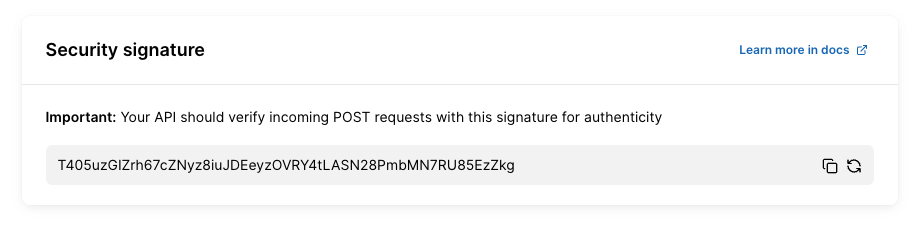
Your webhook signature signature is available in the Merge dashboard (https://app.merge.dev/configuration/webhooks). If you've not done so already, store this key securely in your .env file as MERGE_WEBHOOK_SECRET. Never commit this key to version control or expose it in client-side code.
The verification process works by computing an HMAC digest of the incoming request body using your secret key, then comparing it against the signature Merge includes in the X-Merge-Webhook-Signature header. This ensures the request is authentic and unmodified.
Step 2.3.1: Implementation steps
Add
MERGE_WEBHOOK_SECRETto your.envfile (get this from Merge dashboard)Feed the prompt below to your coding agent
Test with Merge's webhook testing tool in the dashboard
Verify that requests without valid signatures are rejected
Step 2.3.2: Prerequisites
Public endpoint accessible from internet
Webhook URL registered in Merge dashboard
MERGE_SECURITY_SIGNATURE stored in .env file
Step 2.3.3: Implementation
Context:
Merge sends webhook notifications when sync operations complete. These webhooks must be verified to ensure they originate from Merge and haven't been tampered with. Merge signs all webhooks using HMAC-SHA256 with a secret key stored in the MERGE_WEBHOOK_SECRET environment variable.
Requirements:
1. Implement signature verification - create a
verify_merge_webhook_signaturefunction that verifies webhook signatures before they are processed using this this algorithm from Merge's documentation:import base64
import hashlib
import hmac
Swap YOUR_WEBHOOK_SIGNATURE_KEY below with your webhook signature key from: https://app.merge.dev/configuration/webhooks
signature_key = "YOUR_WEBHOOK_SIGNATURE_KEY"
raw_request_body = request.body
Reject any requests without a signature header present
try:
webhook_signature = request.headers["X-Merge-Webhook-Signature"]
except KeyError:
print('No signature sent, request did not originate from Merge.')
raise
Encode request body in UTF-8 and generate an HMAC digest using the webhook signature
hmac_digest = hmac.new(signature_key.encode("utf-8"), raw_request_body.encode("utf-8"), hashlib.sha256).digest()
The generated digest must be base64 encoded before comparing
b64_encoded = base64.urlsafe_b64encode(hmac_digest).decode()
Use hmac.compare_digest() instead of string comparison to prevent against timing attacks
doesSignatureMatch = hmac.compare_digest(b64_encoded, webhook_signature)2. Create webhook endpoint - create a new route at /api/webhooks/merge that accepts POST requests and follows this exact processing order:
Step 1: Verify signature (critical - must be done first). Call the
verify_merge_webhook_signature(request)before any other processing. If verification fails, log warning with timestamp and return 401 Unauthorized immediately. Never accessrequest.jsonbefore signature verification completesStep 2: Parse payload (only after verification). Parse request.json to extract webhook data. Extract
eventfield (e.g., "LinkedAccount.sync_completed"). Extractdataobject containing event-specific information. Log the received event type for debuggingStep 3: Handle events For
LinkedAccount.sync_completedevent: Extractaccount_tokenfrompayload['data']['account_token']. Look up the corresponding Merge Linked Account in your database using the account_token. Call your existing sync/data fetch functions (same code used by polling scheduler). This ensures webhooks and polling use identical, proven sync logicFor unknown event types: log at info level: "Received unknown webhook event: {event_type}". Still return 200 OK (acknowledge receipt)
Step 4: Return response. Return 200 OK status within 30 seconds (Merge will retry two more times if timeout). Response body:
{"received": true}. Merge expects quick acknowledgment, not completion of work4. Error handling - implement comprehensive error handling for all failure scenarios. Security Failures:
Missing signature:
logging.warning(f'Webhook received without signature at {datetime.now()}')
return jsonify({'error': 'Missing signature'}), 401
Invalid signature:
logging.warning(f'Webhook received with invalid signature at {datetime.now()}')
return jsonify({'error': 'Invalid signature'}), 401
Missing MERGE_WEBHOOK_SECRET:
logging.error('MERGE_WEBHOOK_SECRET environment variable not configured')
return jsonify({'error': 'Server configuration error'}), 500Processing Failures:
Account not found:
logging.error(f'Webhook received for unknown account_token: {account_token}')
return jsonify({'received': true}), 200 # Don't retry - account doesn't exist
Database errors:
logging.error(f'Database error processing webhook: {str(e)}', exc_info=True)
return jsonify({'error': 'Processing error'}), 500 # Merge will retryAll security failures (missing/invalid signatures) should be logged for monitoring.
4. Complete route implementation - the webhook route should follow this structure:
@app.route('/api/webhooks/merge', methods=['POST'])
def merge_webhook():
CRITICAL: Verify signature FIRST, before touching request.json
if not verify_merge_webhook_signature(request):
return jsonify({'error': 'Invalid signature'}), 401
Safe to parse JSON after verification
try:
payload = request.json
event_type = payload.get('event')
logging.info(f'Received Merge webhook: {event_type}')
Route to appropriate handler:
if event_type == 'LinkedAccount.sync_completed':
account_token = payload.get('data', {}).get('account_token')
Look up account:
account = MergeLinkedAccount.query.filter_by(
account_token=account_token
).first()
if not account:
logging.error(f'Unknown account_token in webhook: {account_token}')
return jsonify({'received': True}), 200
Call existing sync logic (same as polling uses):
trigger_sync_for_account(account)
Return quick acknowledgment:
return jsonify({'received': True}), 200
except Exception as e:
logging.error(f'Error processing webhook: {str(e)}', exc_info=True)
return jsonify({'error': 'Processing error'}), 500
Step 2.3.4: Critical security requirements
Always verify signature before accessing request.json
Use request.data (bytes) for verification, request.json (parsed) for processing
Use hmac.compare_digest() to prevent timing attacks
Log all security failures for monitoring
Never log the MERGE_WEBHOOK_SECRET value
Step 3: Implementing subsequent sync triggers
The goal of this section is to create the backend triggers that will allow you to fetch incremental updates through polling of Merge's sync-status endpoint and the use of the modified_after timestamp. After the initial sync is completed, you can begin to fetch data from Merge. For each linked account, you'll want to store a last synced timestamp (the start time of a sync between your backend and Merge) and call the list endpoint with modified_after = <last_synced_at>. As opposed to relying solely on the sync status from the sync-status endpoint, you can also fetch data from Merge when your last_synced_at timestamp > last_sync_finished from GET /sync-status.
You can use this timestamp to capture a window of time in which data was updated in Merge by passing the last_sync_finished timestamp as the modified_before query parameter and the timestamp from your most recent fetch as the modified_after query parameter. Note: make sure to store this last_sync_finished timestamp to be used as the next modified_after timestamp.
Step 3.1: Implementing polling (simplest - start here)
The goal of this section is to create the backend triggers needed to determine when subsequent syncs have completed by polling Merge's sync-status endpoint.
Step 3.1.1: Implementation
Context: read the following markdown files to understand Merge integration fundamentals:
1. merge_platform_overview.md - Focus on "Detecting Data Readiness", "Incremental Syncing with Timestamp Parameters", and "Sync Timing Considerations" sections
2. merge_backend_implementation.md - API patterns and timestamp tracking
Prerequisites: initial sync detection must be implemented and initial_sync_complete flag set to true before this logic applies.
Task: implement a polling mechanism that detects when subsequent syncs complete and triggers incremental data fetching using timestamp-based queries with bounded time windows.
Critical Timestamp Terminology
You will track TWO different timestamps per model. Understanding the distinction is crucial:
Your Backend Timestamps:
- last_synced_at - when YOUR backend started fetching data from Merge (records your fetch action)
Merge's Timestamps (from /sync-status response):
- last_sync_finished - when Merge completed syncing from the third-party system (records Merge's sync action)
Usage:
- Use Merge's last_sync_finished to DETECT when new data is available
- Use YOUR last_synced_at as the modified_after parameter when fetching
Requirements
1. Extend Existing Polling Job: the same polling job used for initial sync detection continues running for subsequent syncs:
Polling Pattern:
- Continue running every 5-60 minutes (adjust based on integration's sync frequency - see "Sync Timing Considerations" in markdown)
- For integrations where initial_sync_complete == true, use subsequent sync logic
- Track sync state per model (not just per integration)
2. Subsequent Sync Detection Logic For each model in the sync status response, check if new data is available by comparing timestamps:
for each model in sync_status.results: # Skip disabled models if model.status == "DISABLED": continue
Only process if initial sync previously completed:
if integration.initial_sync_complete == false:
continue
Check if subsequent sync has new data:
has_new_data = (
(model.status in ["DONE", "PARTIALLY_SYNCED"])
AND
(model.last_sync_finished > stored_merge_last_sync_finished
OR stored_merge_last_sync_finished is null)
)
if has_new_data:
# Fetch incremental data for this model
fetch_incremental_data(model)
Critical Logic:
- Accept both `DONE` and `PARTIALLY_SYNCED` status (unlike initial sync)
- Compare Merge's `last_sync_finished` from API with your stored value
- Only fetch if Merge's `last_sync_finished` is newer than what you've already processed
- Handle `null` values for `last_sync_finished` (FAILED syncs, ongoing SYNCING)
3. Database Tracking (Per Model)
Track BOTH timestamp types for each model within each integration:
Required fields per model:
- `linked_account_id` - Foreign key to integration
- `model_id` - Model identifier (e.g., "hris.Employee")
- `last_synced_at` - When YOU last started fetching from Merge (YOUR timestamp)
- `merge_last_sync_finished` - Merge's `last_sync_finished` from previous fetch (MERGE's timestamp)
- `last_fetched_at` - When fetch completed (for monitoring)
- `status` - Current status (DONE, PARTIALLY_SYNCED, SYNCING, FAILED)
Why track both timestamps:
- `merge_last_sync_finished`: Compare with current value to detect if new Merge sync occurred
- `last_synced_at`: Use as `modified_after` parameter to fetch only records since your last fetch
4. Incremental Data Fetching with Bounded Time Windows
When a model shows new data is available:Record when YOU start fetching: your_last_synced_at = current_timestamp()
Fetch data with bounded time window: GET /api/{category}/v1/{model}?modified_after={stored_last_synced_at}&modified_before={current_merge_last_sync_finished}
Example: GET /api/hris/v1/employees?modified_after=2024-01-15T10:35:00Z&modified_before=2024-01-15T22:46:41Z
Timestamp Parameters:
- `modified_after`: YOUR stored `last_synced_at` from previous fetch
- `modified_before`: Merge's current `last_sync_finished` from `/sync-status` response
- This creates a precise bounded window capturing only data synced since your last fetch
- Handle pagination - data results are paginated
First Subsequent Fetch:
- Your stored `last_synced_at` may be `null` (no previous fetch)
- Omit `modified_after` parameter on first fetch (or use Merge's previous `last_sync_finished`)
- Only include `modified_before` to bound the window
After Successful Fetch:
- Store YOUR `last_synced_at` (timestamp when you started this fetch)
- Store Merge's `last_sync_finished` (for detecting next sync)
- Update `last_fetched_at` to current time
- Save fetched data to your database
5. Handle Edge Cases
FAILED Syncs:
- `last_sync_finished` may be `null` or outdated
- Skip fetching for FAILED status
- Log for monitoring but don't crash
SYNCING in Progress:
- `status` is "SYNCING" but `last_sync_result` shows previous sync outcome
- If `last_sync_result` is "DONE" or "PARTIALLY_SYNCED", previous data available
- Check if previous `last_sync_finished` is newer than stored - if yes, fetch using previous sync's timestamp
PARTIALLY_SYNCED:
- Acceptable for subsequent syncs (you already have baseline data)
- Fetch incremental updates even if sync partially completed
- Particularly valuable for high-frequency integrations
First Subsequent Sync:
- Your stored `last_synced_at` may be `null`
- Fetch all data available up to `modified_before={merge_last_sync_finished}`
- Store both timestamps for future incremental fetches
6. Dynamic Polling Frequency
Adapt polling interval based on integration's sync frequency:Calculate sync frequency from sync status
sync_frequency = next_sync_start - last_sync_start
if sync_frequency < 1 hour: High-frequency integration (5-15 min syncs) poll_interval = 5-10 minutes
else: Standard frequency integration (24 hour syncs) poll_interval = 30-60 minutes
Use `next_sync_start` and `last_sync_start` fields to determine optimal polling interval.
Expected Flow
Ongoing Subsequent Syncs:
1. Polling job runs → Checks `/sync-status` for integration with `initial_sync_complete == true`
2. For each model, compare Merge's `last_sync_finished` from API with stored value
3. If newer → Record YOUR `last_synced_at`, fetch data with bounded window
4. Store BOTH timestamps (yours + Merge's)
5. Repeat on next poll
Example Scenario:Previous fetch state
Stored: last_synced_at = 2024-01-15T10:35:00Z Stored: merge_last_sync_finished = 2024-01-15T10:30:00Z
Current poll
API returns: last_sync_finished = 2024-01-15T22:46:41Z (NEWER - new data!)
Fetch incremental update
Record: last_synced_at = current_time() = 2024-01-15T22:50:00Z Fetch: GET /employees?modified_after=2024-01-15T10:35:00Z&modified_before=2024-01-15T22:46:41Z
Result: Only employees modified between 10:35 (your last fetch) and 22:46 (Merge's latest sync)
Store for next time
Store: last_synced_at = 2024-01-15T22:50:00Z Store: merge_last_sync_finished = 2024-01-15T22:46:41Z
Implementation Notes
- Reuse the same polling job from initial sync detection
- Add conditional logic: if `initial_sync_complete`, use subsequent sync logic
- Track BOTH timestamp types per model
- Use Merge's timestamp to detect new data, YOUR timestamp for fetching
- Create precise time windows with `modified_after` + `modified_before`
- Consider sync frequency when setting poll interval (see markdown)
- Log verbosely - timestamp tracking is complex, good logging helps debugging
Testing Checklist
- [ ] Polling job handles both initial and subsequent sync logic
- [ ] Correctly detects new data by comparing Merge's `last_sync_finished` timestamps
- [ ] Records YOUR `last_synced_at` when starting each fetch
- [ ] Uses correct timestamps: YOUR `last_synced_at` for `modified_after`, Merge's for `modified_before`
- [ ] Stores BOTH timestamps after successful fetch
- [ ] Accepts both DONE and PARTIALLY_SYNCED status for subsequent syncs
- [ ] Creates proper bounded windows with both query parameters
- [ ] Handles pagination in data fetch responses
- [ ] Skips DISABLED and FAILED models appropriately
- [ ] Handles SYNCING status with previous successful sync result
- [ ] Works when stored `last_synced_at` is null (first fetch)
- [ ] Adapts polling frequency based on integration's sync cadence
- [ ] Tracks state independently for each model
- [ ] Prevents duplicate fetches using `last_synced_at`
Begin implementation following patterns from your existing codebase. Reference the markdown files for complete timestamp handling patterns and sync frequency considerations.
Step 3.1.2: Testing subsequent sync triggers and polling
At this point, you start fetching data from Merge using the stored timestamps. Confirm that you're seeing data that has been updated or added in accordance with the timestamps that are passed
Step 3.2: Implementing subsequent sync webhooks
The goal of this section is to create backend triggers using webhooks, though this step is optional if you do not currently have support built out for webhooks.
Merge offers two types of synced notification webhooks - {CommonModel}.synced webhooks sends 1 notification per model upon completion, while
LinkedAccount.synced_completed sends 1 notification when all models complete. {CommonModel} synced webhooks are recommended if you have a lot of data to sync.
Additionally, the same security principles mentioned earlier when setting up initial sync webhooks still apply. Make sure you verify the webhook signature.
It's important to remember that webhooks must not be your only method of retrieving data. If your receiver misses a series of webhooks and you're not set up to poll, you may lose data. Merge does attempt to redeliver multiple times using exponential backoff, but we still recommend calling your sync functions periodically every 24 hours.
Step 3.2.1: Implementation
Context Read the following markdown files to understand Merge integration fundamentals:
1. merge_platform_overview.md - Focus on "Trigger Detection Methods > Webhooks", "Incremental Syncing with Timestamp Parameters", and webhook payload structures
2. merge_backend_implementation.md - Webhook security and API patterns
Prerequisites: initial sync detection must be implemented and initial_sync_complete flag set to true before this logic applies.
Task: implement webhook endpoints to receive real-time sync notifications from Merge. Webhooks provide immediate last_sync_finished timestamps when syncs complete, eliminating the need for polling and sync frequency considerations.
Critical Webhook Requirements
IMPORTANT - Asynchronous Processing Required:
- Merge has a 30-second timeout for webhook responses - If your endpoint doesn't respond within 30 seconds, the delivery is considered failed
- Merge will retry failed webhooks up to 2 additional times (3 total delivery attempts)
- Best practice: Return 200 OK immediately, process webhook payload asynchronously in background job
Critical Timestamp Terminology
You will track TWO different timestamps per model:
Your Backend Timestamps:
- last_synced_at - When YOUR backend started fetching data from Merge
Merge's Timestamps (from webhook payload):
- last_sync_finished - When Merge completed syncing from the third-party system
Usage:
- Use Merge's last_sync_finished from webhook to DETECT when new data is available
- Use YOUR last_synced_at as the modified_after parameter when fetching
Requirements
1. Choose Webhook Type Merge offers two webhook types. Choose based on your use case:
Option A: Linked Account Synced Webhook (`LinkedAccount.sync_completed`)
- Best for: Simplicity, getting all models in one notification
- Webhook event: LinkedAccount.sync_completed'
- Payload: Includes all models for the linked account
Option B: Common Model Synced Webhooks (`{CommonModel}.synced`)
- Best for: High-volume data, granular control per model
- Webhook events: Employee.synced, Company.synced, TimeOff.synced, etc.
- Payload: Single model per webhook
Do not make any immediate changes. Wait for next prompt.
2. Implement Webhook Endpoint with Asynchronous Processing
For Option A: Linked Account Synced Webhook
Endpoint: POST /webhooks/merge/sync-completed
Implementation Pattern:
def webhook_handler(request):
1. Verify signature FIRST (security critical) if not verify_webhook_signature(request): return 401 Unauthorized
2. Parse webhook payload:
payload = parse_json(request.body)
3. Queue for asynchronous processing (CRITICAL for 30s timeout):
background_job_queue.enqueue(process_sync_webhook, payload)
4. Return 200 OK immediately (within seconds, not minutes):
return 200 OKdef process_sync_webhook(payload): # This runs asynchronously in background # Extract data and process without time constraints linked_account_id = payload['linked_account']['end_user_origin_id'] sync_status = payload['data']['sync_status']
for model_id, model_data in sync_status.items():
if model_data['last_sync_result'] == 'FAILED':
continue
# Compare timestamps, fetch data, etc.
process_model_sync(linked_account_id, model_id, model_data)
Expected Payload Structure:
{ "hook": { "id": "...", "event": "LinkedAccount.sync_completed", "target": "https://yourapp.com/webhooks/merge/sync-completed" }, "linked_account": { "id": "4ac10f37-c656-4e9a-89a1-1b04f9e9a343", "end_user_origin_id": "org_123_hris", "integration_slug": "bamboohr", "category": "hris" }, "data": { "is_initial_sync": false, "sync_status": { "hris.Employee": { "last_sync_finished": "2024-01-15T22:46:41Z", "last_sync_result": "DONE" }, "hris.Company": { "last_sync_finished": "2024-01-15T22:45:30Z", "last_sync_result": "PARTIALLY_SYNCED" }, "hris.TimeOff": { "last_sync_finished": "2024-01-15T22:44:15Z", "last_sync_result": "FAILED" } } } }Processing Logic (in background job):
1. Extract linked_account.end_user_origin_id to identify integration in your database
2. For each model in data.sync_status:
a. Skip if last_sync_result is "FAILED"
b. Accept "DONE" or "PARTIALLY_SYNCED" (subsequent syncs can handle partial data)
c. Compare webhook's last_sync_finished with your stored value
d. If newer:
- Record your last_synced_at = current_time()
- Fetch incremental data using timestamp window
- Store both timestampsFor Option B: Common Model Synced Webhooks
Endpoint: POST /webhooks/merge/model-synced
Implementation Pattern:
def webhook_handler(request):
# 1. Verify signature
if not verify_webhook_signature(request):
return 401 Unauthorized
# 2. Parse payload
payload = parse_json(request.body)
# 3. Queue for async processing
background_job_queue.enqueue(process_model_sync_webhook, payload)
# 4. Return 200 OK immediately
return 200 OKExpected Payload Structure:
{ "hook": { "id": "...", "event": "Employee.synced", "target": "https://yourapp.com/webhooks/merge/model-synced" }, "linked_account": { "id": "a3602c03-aba7-4d9d-a349-dbc338504092", "end_user_origin_id": "org_123_hris", "integration_slug": "bamboohr", "category": "hris" }, "data": { "sync_status": { "model_name": "Employee", "model_id": "hris.Employee", "last_sync_finished": "2024-01-15T22:46:41Z", "last_sync_result": "DONE", "status": "DONE" }, "synced_fields": ["first_name", "last_name", "work_email"] } }
Processing Logic (in background job):
1. Extract linked_account.end_user_origin_id and data.sync_status.model_id
2. Skip if last_sync_result is "FAILED"
3. Accept "DONE" or "PARTIALLY_SYNCED"
4. Compare webhook's last_sync_finished with stored value
5. If newer, fetch incremental data for this specific modelBegin implementing this prompt, but more will follow.
3. Webhook Signature Verification
CRITICAL: Always verify webhook signatures before processing. See merge_backend_implementation.md for signature verification implementation.
Steps:
1. Extract X-Merge-Webhook-Signature header from request
2. Compute HMAC-SHA256 signature using webhook secret and request body
3. Compare computed signature with header value
4. Reject webhook if signatures don't match (return 401)
Important: Signature verification must happen synchronously before returning 200 OK.
4. Database Tracking (Per Model)
Track BOTH timestamp types for each model:
Required fields per model:
- linked_account_id - Foreign key to integration
- model_id - Model identifier (e.g., "hris.Employee")
- last_synced_at - When YOU last started fetching from Merge
- merge_last_sync_finished - Merge's last_sync_finished from previous webhook
- last_fetched_at - When fetch completed (for monitoring)
5. Incremental Data Fetching with Bounded Time Windows
When webhook indicates new data (newer last_sync_finished):
# Record when YOU start fetching
your_last_synced_at = current_timestamp()
# Fetch data with bounded time window
GET /api/{category}/v1/{model}?modified_after={stored_last_synced_at}&modified_before={webhook_last_sync_finished}
# Example:
GET /api/hris/v1/employees?modified_after=2024-01-15T10:35:00Z&modified_before=2024-01-15T22:46:41ZTimestamp Parameters:
- modified_after: YOUR stored last_synced_at from previous fetch
- modified_before: Merge's last_sync_finished from webhook payload
- Creates precise window capturing only data synced since your last fetch
- Handle pagination - data results are paginated
First Subsequent Fetch:
- Your stored last_synced_at may be null (no previous fetch)
- Omit modified_after parameter on first fetch
- Only include modified_before to bound the window
After Successful Fetch:
- Store YOUR last_synced_at (timestamp when you started this fetch)
- Store Merge's last_sync_finished from webhook
- Update last_fetched_at to current time
- Save fetched data to your database
6. Handle Webhook-Specific Edge Cases
30-Second Timeout:
- Critical: Webhook handler must return 200 OK within 30 seconds
- Use background job queue (Celery, Redis Queue, etc.) for async processing
- Don't perform data fetching in webhook handler itself
- Log webhook receipt immediately for debugging
Retry Behavior:
- Merge retries failed webhooks up to 2 additional times (3 total attempts)
- Your timestamp comparison naturally handles duplicate deliveries
- If webhook processing fails in background, Merge's retry will send it again
- Return 200 OK for duplicates (timestamp comparison prevents re-processing)
Duplicate Webhooks:
- Merge may send duplicate webhooks for reliability
- Your timestamp comparison naturally handles this
- If webhook_last_sync_finished <= stored_last_sync_finished, skip processing
FAILED Syncs:
- Skip models where last_sync_result == "FAILED"
- Log for monitoring but don't attempt to fetch
PARTIALLY_SYNCED:
- Acceptable for subsequent syncs (you have baseline data)
- Fetch incremental updates even if sync partially completed
- Especially useful for high-volume data
Out-of-Order Webhooks:
- Webhooks may arrive out of order
- Timestamp comparison handles this: only process if newer than stored value
7. Response Requirements
HTTP Response - Synchronous Part:
1. Verify webhook signature (synchronous - required for security)
2. Queue webhook for background processing (milliseconds)
3. Return 200 OK status (within seconds, not 30 seconds)
Return Codes:
- 200 OK: Successfully received and queued (Merge won't retry)
- 401 Unauthorized: Invalid signature (Merge won't retry)
- 5xx Server Error: Temporary failure (Merge will retry up to 2 more times)
- Never return 4xx errors except 401 for auth failures
Expected Flow
Real-Time Webhook Flow:
1. Merge completes sync → Sends webhook to your endpoint
2. Your endpoint receives webhook within milliseconds
3. Verify signature synchronously (< 1 second)
4. Queue webhook payload for background processing (< 1 second)
5. Return 200 OK (total time < 5 seconds)
6. Background job processes webhook:
- Extract last_sync_finished for affected model(s)
- Compare with stored merge_last_sync_finished
- If newer:
-- Record last_synced_at = current_time()
-- Fetch: GET /model?modified_after={your_last_synced_at}&modified_before={webhook_last_sync_finished}
-- Store both timestamps
Example Scenario:
Previous fetch state:
Stored: last_synced_at = 2024-01-15T10:35:00Z
Stored: merge_last_sync_finished = 2024-01-15T10:30:00Z
Webhook received:
Webhook payload: last_sync_finished = 2024-01-15T22:46:41Z
Synchronous part (< 5 seconds):
- Verify signature ✓
- Queue for background processing ✓
- Return 200 OK ✓Asynchronous part (background job):
if 2024-01-15T22:46:41Z > 2024-01-15T10:30:00Z:
Record: last_synced_at = current_time() = 2024-01-15T22:50:00Z
Fetch: GET /employees?modified_after=2024-01-15T10:35:00Z&modified_before=2024-01-15T22:46:41Z
Store: last_synced_at = 2024-01-15T22:50:00Z
Store: merge_last_sync_finished = 2024-01-15T22:46:41ZImplementation Notes
- CRITICAL: Return 200 OK within 30 seconds to avoid retries
- Always process webhooks asynchronously using background job queue
- Webhooks eliminate need for sync frequency considerations - notifications are real-time
- Always verify webhook signatures before queueing
- Track BOTH timestamp types per model
- Use Merge's timestamp to detect new data, YOUR timestamp for fetching
- Create precise time windows with modified_after + modified_before
- Deduplication happens naturally through timestamp comparison
- Log all webhook events (receipt + processing) for debugging
- Consider implementing polling as backup safety net (separate guide section)
Testing Checklist
- Webhook endpoint accepts POST requests at correct URL
- Webhook signature verification implemented and working
- Returns 200 OK within 5 seconds (well under 30s timeout)
- Background job queue configured and processing webhooks asynchronously
- Correctly extracts last_sync_finished from webhook payload
- Identifies integration using end_user_origin_id
- Compares webhook timestamp with stored value
- Records YOUR last_synced_at when starting fetch
- Uses correct timestamps: YOUR last_synced_at for modified_after, webhook's for modified_before
- Stores BOTH timestamps after successful fetch
- Accepts both DONE and PARTIALLY_SYNCED results
- Skips FAILED syncs appropriately
- Handles pagination in data fetch responses
- Handles duplicate webhooks gracefully (timestamp comparison prevents re-processing)
- Handles out-of-order webhooks correctly
- Tracks state independently for each model
- Works when stored last_synced_at is null (first fetch)
- Tested with simulated 30+ second processing time - still returns 200 OK quickly
Begin implementation following patterns from your existing codebase. Reference the markdown files for complete webhook payload structures and signature verification details.